Alaska Airlines

Info
As a Product Design Intern for Alaska Airlines, I worked cross-functionally on 5 key projects that support Alaska's Maintenance & Engineering tools and operations.
Key projects
MxHub Generative AI Summarization & Media Attachment (iOS)
MEL Live Catalog (Web)
Linus Display (Web Display)
Product Vision Workshop
takeaways
Alaska Airlines shaped me as a designer, product owner, leader and so much more…
Design for your users, not assumptions.
From day one, my managers taught me to ground every design decision in user research and personas. Working in a safety-first, user-first space taught me to truly listen and build for real user needs.
Design for consistency and scalabilty.
Alaska’s design ecosystem was highly fragmented, so I collaborated with cross-functional teams to create unified, scalable design solutions that improved consistency across all of our products.
Ask the right questions.
In the complex world of backend maintenance and engineering, I learned to ask sharper questions and uncover ways to achieve better results with less effort.
Project 01
MxHub - AI Summarization & Media Attachment
Background
Alaska Airlines’ MxHub iPad app is the core platform for 1k+ maintenance technicians to read, log, and respond to aircraft messages in real time.
Problem
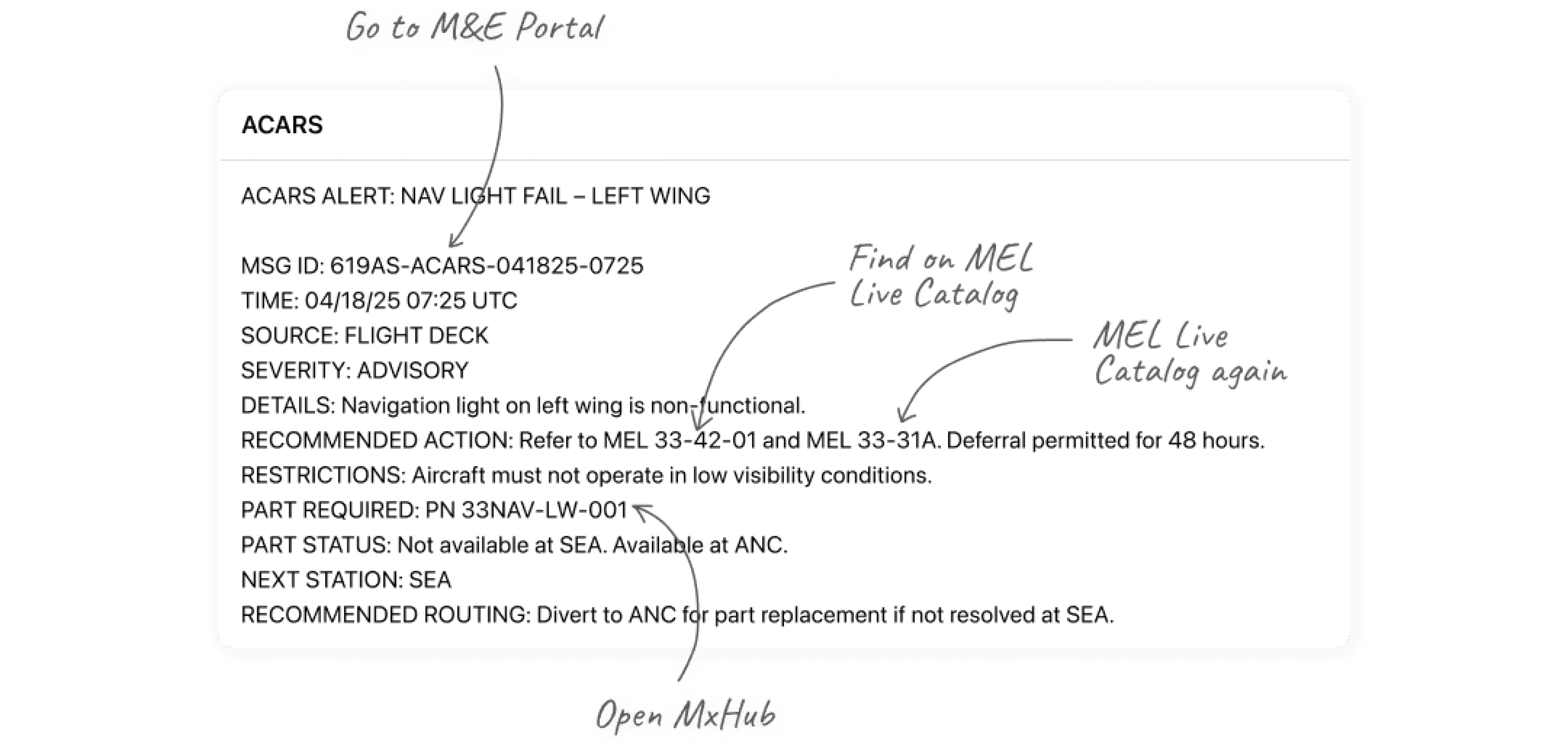
Each flight sends hundreds of cryptic ACARS messages, forcing technicians to navigate fragmented tools to find the right deferral actions, causing information overload, slower decisions, and low confidence.
So how might we…
Leverage generative AI to turn complex ACARS data into clear, trustworthy insights—helping technicians make faster, more confident decisions without compromising Alaska's core value: Safety First.
research
I conducted field observations, user interviews, and landscape reviews, and built user personas to understand how technicians interact with ACARS in real time and where AI could make the biggest impact.
Field observation and user interview key insights:
01
Long interpretation times
It took an average of 5 minutes to interpret a single ACARS message due to its cryptic format, requiring multiple rounds of cross-checking across different platforms for validation.
02
Low user confidence
Technicians frequently switch between multiple platforms to verify message accuracy, slowing decision-making and lowering overall confidence (SUS 3.1 / 5).
03
Steep learning curve
New hires find extreme difficulty interpreting message codes accurately, requiring additional training.
Landscape Review
By analyzing leading AI and summarization tools, I identified key opportunities to enhance Generative Summaries in the iOS ecosystem based on their use cases, entry points, interfaces, and strengths.


Key Insights
01 Effective entry points and visibility is crucial
While the AI tool should remain visible, in high-risk environments it should be secondary—collapsible, expandable, and quietly supportive rather than intrusive.
02 Summaries come before questions
Guiding users from key information to supplemental questions provide the most intuitive workflow and navigation.
03 Encourage human judgment—AI should assist, not instruct
In a safety-first environment like Alaska Airlines, AI should enhance and guide user workflows, but not replace them.
Value proposition
Given all the consolidated datas and information above, Generative AI Summary is a worthwhile feature to implement as it provides value to both the users and the business.
User Goals (Technicians)
Faster clarity
Cut ACARS reading time from ~5 minutes to ~3 minutes, saving them hours on a weekly basis.
Safety-first
Ensure technicians rely on human judgment by keeping AI features limited to essential guidance.
No learning curve
By eliminating the need for prompting, users don't need to spend time figuring out the tool.
Business Goals
Customer satisfaction
Faster maintenance turnaround time → fewer delays and reduced Out-of-Service aircraft
Operational efficiency
Streamlines technicians’ workflows by guiding focus through AI-powered prioritization.
Scalable foundation
Sets the precedent for future predictive maintenance tools.
Defining success
My north stars were:
01 Reduce message interpretation time
Target metric: Decrease ACARS message reading time from ~5 minutes to under 3 minutes (a 40% reduction) without loss of accuracy.
Success when: Technicians report faster turnaround and higher confidence interpreting messages during simulated tests or early field pilots.
02 Maintain a simple, familiar experience
Target metric: Achieve >90% task completion rate on first use without guidance or training.
Success when: No new prompts or commands introduced; users can navigate using their existing mental models.
Exploring COncepts
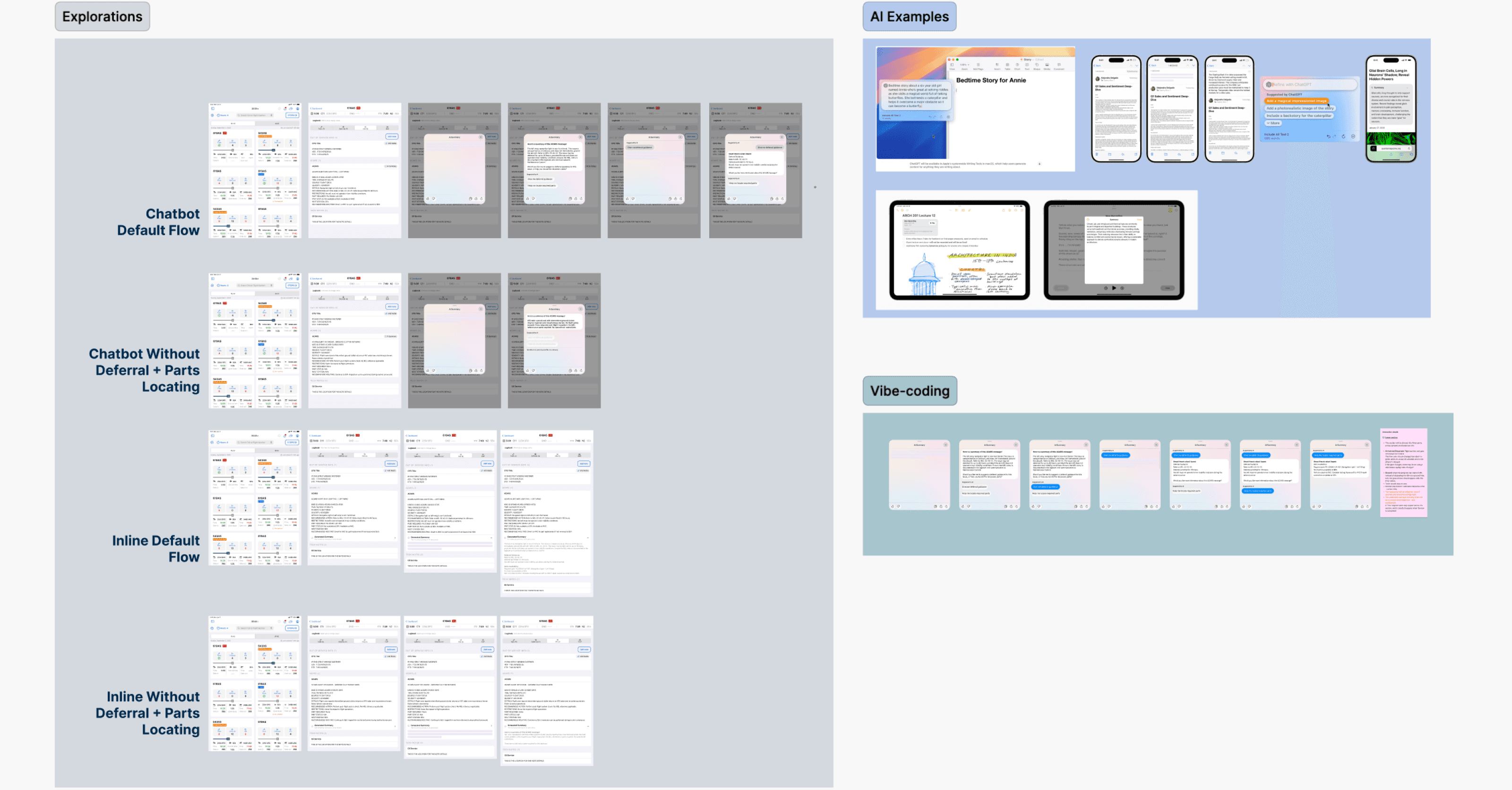
I sketched and prototyped multiple flows to visualize how AI could naturally live within MxHub.
Inline Summaries
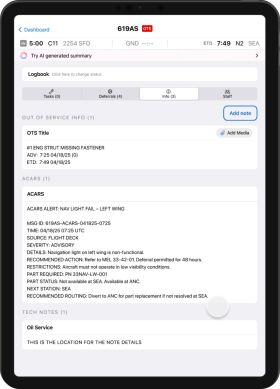
AI-generated summaries, deferral guidance, and parts locating appear directly beneath each message, minimizing context-switching.
Pop-up AI Assistant
A seperate AI assistant that pop-up which slightly breaks away from the flow, but would make sure users also dont get dependent.
Prototype
Final Design
Pop-up AI Assistant
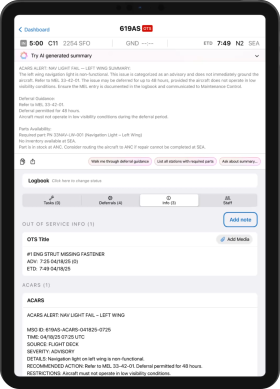
The final design uses an inline AI summary placed at the top of the screen with a touch of refinement.
This layout minimizes context-switching, supports rapid scanning, and scales easily as new summarization and attachment features are added to MxHub.
Why this design worked…
Surface AI summary without distraction.
By positioning the AI summary at the top of the page as its entry point, it does not distract from the ACARS message and pushes it down to avoid being invasive.
This AI summarization tool is intentionally designed as a subtle, secondary tool—enhancing the workflow without drawing focus.
Simple Summary View
After selecting the entry point, the banner expands and the summary is displayed.
This summary is based off the Simple Summary model and is intended for only the ACARS message shown, deferral guidance, and parts locating.
AI Assistant Pill Button
If the user selects the “Ask about summary” or other buttons in the summary view, a prompt field appears where the user can select prompted questions.
The summary is scrollable with the prompt field and keyboard in view so the user can refer to the content while generating a prompt, easing the learning curve.
Results
50% Faster Message Review
Technicians processed ACARS messages 50% faster, cutting average triage time and exceeding the defined product performance goals during testing.
100% Pilot Adoption
All participating technicians integrated the new workflow within the first two weeks of rollout — no training required.
By eliminating the need for prompting, users don't need to spend time figuring out the tool.
30% Increase in Operational Efficiency
By reducing context-switching and simplifying workflows, engineers processed more maintenance cases per shift without increasing workload.
First AI Implementation in MxHub
Post-implementation surveys showed that 95% of testers described the summaries as “clear,” “reliable,” and “time-saving,” marking a major step toward scalable AI integration in safety-critical systems.
Next steps
For the next rollout, I would integrate…
Predictive insights
Expand the AI model to suggest likely fault causes based on historical data.
Cross-system integration
Connect summaries with other MxHub modules to create a unified maintenance dashboard.
Project 02
MEL Live Catalog
Background
I modernized and integrated Alaska Airlines’ MEL Live Catalog, into M&E Portal, a multi-product platform.
Problem
While the MEL Live Catalog has been used for over 2 decades, it has not been modernized, slowing down workflows in a time-sensitive, compliance-critical environment for 2k+ technicians.

Because of the lack of modernization, there was a lot of tech and design debt to address, and I kicked off the project by conducting user interviews with 3 technicians.
research
Despite its importance, the MEL tool was one of the least efficient systems in their workflow.
Field observation and user interview key insights:
01
Outdated interface
Built in the 1990s, the MEL’s fragmented pop-ups make it hard for users to quickly find key dispatch and safety information.
02
Lack of integration
Despite its importance, the MEL Live Catalog’s separation from the main platform forces technicians to switch tools, slowing down everyday workflows.
03
Poor user experience
Users found it difficult to use due to its outdated interface and unintuitive workflows, leading to frequent slowdowns.
Concept Exploration
During the redesign that would now live within M&E Portal, my main focus was how to display MEL data without overwhelming users, and aligning it with the M&E Portal design system.
I explored three navigation models:
Tab View
Provided direct access to information with a clear, spatial relationship between MEL categories.
Dropdown menu
Allowed flexible filtering but added unnecessary steps and buried visibility of key categories.
Segmented Control
Clean and compact, but restrictive for displaying multiple datasets at once.
I ultimately chose the Tab View for its clarity, scalability, and alignment with technicians’ mental models.
Why it worked:
Familiar Interaction Pattern
Mirrors how technicians navigate other M&E tools.
Always visible
Users can switch instantly without extra clicks like the dropdown menu.
Scalable Info Architecture
The tab structure supports future feature growth, without redesigning navigation.
Prototype
Final Design: Tab View
The new MEL Live Catalog is now embedded directly inside M&E Portal, creating a unified, modern experience for technicians.
Impact
Given all the consolidated datas and information above, Generative Summary is a worthwhile feature to implement as it provides value to both the users and the business.
45% faster MEL lookup during usability testing
Technicians located and verified MEL references 45% faster during usability testing, reducing delays in pre-flight checks.
95% user satisfaction
Post-launch surveys showed that 95% of technicians rated the new catalog as “easy to navigate” and “visually clear.”
100% Adoption upon rollout
All participants transitioned to the new integrated MEL within the first two weeks—no training or onboarding needed.
Stronger Decision Confidence
Technicians reported higher confidence in interpreting MEL data, citing better clarity and consistency across modules.
“It’s clean, fast, and finally feels like part of our workflow—not a separate tool.”
— Maintenance Engineer, Alaska Airlines
Project 03
Linus Display Redesign (coming soon)
I redesigned a legacy data visualization tool used by 2K+ technicians, modernizing one of Alaska’s oldest internal systems through the Auro Design System.
Project 04
Product Vision Workshop (coming soon)
I had the opportunity to collaborated with leadership to lead a system-wide product vision workshop, aligning cross-functional teams around shared priorities and actionable goals. I synthesized hundreds of qualitative and quantitative data points into a concise readout that continues to inform product strategy and design decisions.